How to Train an AI Agent with OpenEnv and GRPO
Learn how to train a stateful AI agent with Hugging Face TRL, OpenEnv, and GRPO. Build an environment, define rewards, connect tools, run training, and evaluate the resulting agent.
On this page
Training an AI agent is different from teaching a model to produce a better single answer. An agent may need to call tools, observe the result, change its plan, and try again before reaching a useful outcome. Hugging Face's Transformers Reinforcement Learning (TRL) library now provides an OpenEnv integration that lets developers train models inside stateful environments, while Group Relative Policy Optimization (GRPO) supplies the reinforcement-learning method for improving those interactions.
This tutorial builds a small environment-based training workflow with TRL's GRPOTrainer. The example uses an echo environment because it makes the training loop easy to inspect, but the same structure can be adapted to games, browser tasks, coding environments, or other problems where the agent's next observation depends on its previous action.
What OpenEnv Changes About Agent Training
A conventional language-model training example can treat every prompt and response as an isolated exchange. That model becomes less useful when the task depends on state. For example, a web agent might open a page, click a control, receive a new page state, and then decide what to do next. OpenEnv provides a standardized way to expose that type of environment through an interface that the trainer can interact with across multiple turns.
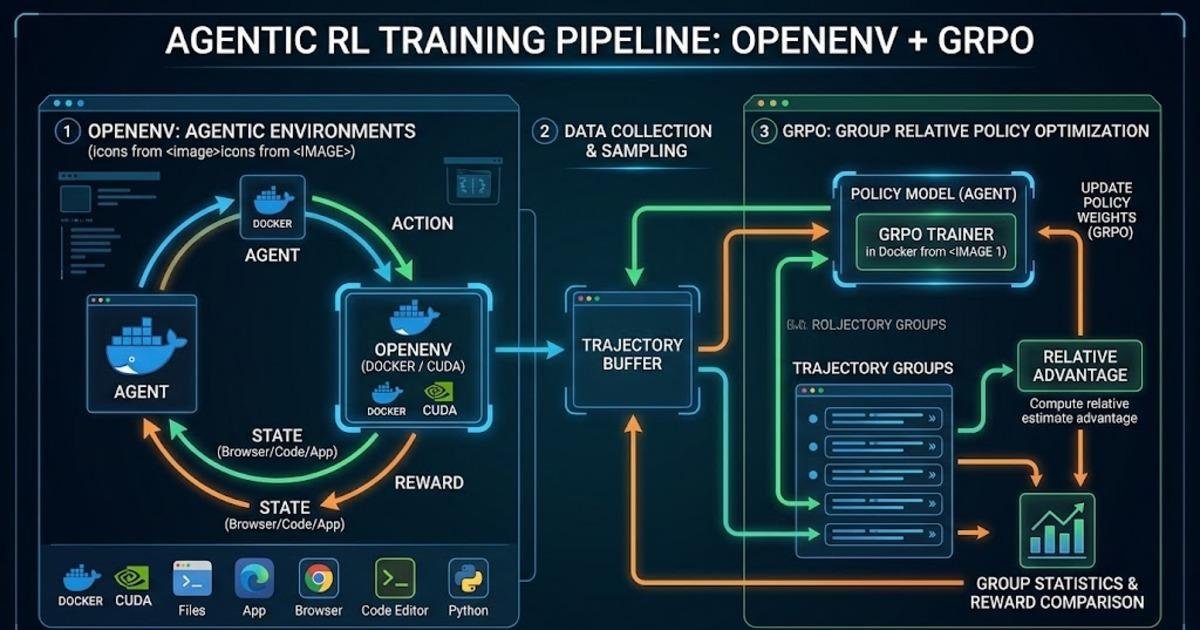
In TRL, an environment can expose public methods as tools. The trainer generates a response, parses a tool call, executes the corresponding environment method, adds the result to the conversation, and lets the model continue. A reward function then converts the final state or environment result into a numerical signal that tells GRPO how useful the rollout was.
Prerequisites
You need Python, a recent TRL installation, a compatible language model, and access to a GPU environment suitable for model training. The exact hardware requirement depends heavily on the model and training configuration, so a small model is a sensible starting point. Hugging Face's documentation includes small OpenEnv examples and separate examples for asynchronous GRPO when you need to scale generation and training independently.
Install the core packages in your Python environment before creating the training script:
pip install -U trl datasetsIf your selected environment requires an additional package, install that environment's dependency as well. The important part is that the environment exposes the interface expected by TRL's environment_factory integration.
Create the Training Environment
An OpenEnv-compatible training class needs a reset operation and one or more public tool methods. The reset method establishes the beginning of an episode, while the tool methods let the model interact with the environment. TRL discovers those public methods and uses their docstrings and typed arguments to construct the tool definitions presented to the model.
For a minimal example, imagine an environment that receives a message and returns the same message. The environment can also record a reward based on whether the interaction satisfies the task.
class EchoToolEnv:
    def __init__(self):
        self.reward = 0.0

    def reset(self, **kwargs):
        self.reward = 0.0
        return None

    def echo(self, message: str) -> str:
        """
        Echo a message back to the environment.

        Args:
            message: Text that should be echoed.
        """
        self.reward = 1.0 if message else 0.0
        return message
The example deliberately keeps the environment simple. In a real project, the tool could instead represent an action such as opening a document, querying a database, moving through a game state, or modifying a sandboxed workspace. The key difference is that the environment maintains state between turns rather than treating every tool call as an unrelated request.
Prepare the Training Dataset
The dataset provides prompts that tell the model what it should accomplish. For environment-based training, each prompt can be represented as a message list. The model then learns from the interaction between its generated tool calls, the environment's observations, and the reward returned after the episode.
from datasets import Dataset

dataset = Dataset.from_dict({
    "prompt": [[
        {
            "role": "user",
            "content": "Use the echo tool to send the message Hello World!"
        }
    ]] * 64
})
Repeating a simple prompt is useful for understanding the mechanics, but it should not be mistaken for a meaningful production training dataset. A practical agent needs diverse tasks and a reward signal that distinguishes useful behavior from merely producing valid tool calls.
Add a Reward Function
Reinforcement learning needs a way to measure the result of an agent's behavior. In this example, the environment stores its reward after the tool interaction, and the reward function reads that value from each environment instance. TRL then uses those scores when calculating the GRPO training signal.
def reward_func(environments, **kwargs):
    return [env.reward for env in environments]
This is where most real-world projects become more interesting. A coding agent might receive a reward when its generated patch passes tests. A browser agent might receive a reward when it reaches the requested page state. A game-playing agent might receive a reward based on its score or whether it completed the objective.
Connect OpenEnv to GRPOTrainer
Now connect the dataset, reward function, model, and environment class to GRPOTrainer. The important argument is environment_factory. TRL creates an environment instance for each generation and manages the multi-turn interaction loop rather than requiring you to write that loop yourself.
from trl import GRPOConfig, GRPOTrainer

trainer = GRPOTrainer(
    model="Qwen/Qwen3-0.6B",
    train_dataset=dataset,
    reward_funcs=reward_func,
    args=GRPOConfig(
        chat_template_kwargs={"enable_thinking": False},
        log_completions=True,
    ),
    environment_factory=EchoToolEnv,
)

trainer.train()
During training, the model receives the task, decides whether to call the available tool, receives the tool result, and can continue generating. Once the episode ends, the reward function scores the environment state. This gives the trainer a complete sequence rather than only a single input-and-output pair.
Understand the Multi-Turn Loop
The interaction can be thought of as four stages. First, the environment is reset and the model receives the initial prompt. Second, the model generates a response and TRL identifies any tool call. Third, the environment executes the tool and returns an observation to the model. Finally, the model continues until it stops calling tools or reaches the configured completion limit.
- Reset: Start a clean environment state.
- Generate: Let the model decide what action to take.
- Interact: Execute the selected environment tool and return the observation.
- Score: Calculate the reward after the episode.
This distinction matters when designing rewards. If the environment only rewards the final answer but ignores intermediate behavior, the model may discover unexpected paths to reach the score. That can be useful for some tasks, but it can also produce brittle behavior if the environment does not verify the actual objective.
Use Stateful Tasks Instead of Simple Tools
OpenEnv becomes more useful when the next observation depends on what the model did previously. A Wordle-style environment, for example, can maintain the hidden word and reveal feedback after every guess. A browser environment can maintain the current page. A coding environment can maintain files and test results. Hugging Face's current examples include environments for Wordle, Sudoku, browser interaction, games, and other agentic workflows.
For these tasks, an environment method should change the underlying state and return an observation that helps the model choose its next action. The reward should measure the actual objective rather than whether a particular tool was called. That makes the training signal closer to the behavior you eventually want from the deployed agent.
Handle Environment Concurrency
GRPO commonly generates multiple responses for the same prompt so that their relative rewards can be compared. When an environment is remote, that means several environment sessions may be active at once. Hugging Face's documentation warns that a default OpenEnv server may allow only one concurrent session, which can cause training failures when multiple generations run simultaneously.
If your environment supports parallel sessions, configure its concurrency limit to match the training workload. For example, if your generation batch requires 64 simultaneous environments, the server needs enough capacity to handle those sessions. This is not merely a performance setting: insufficient concurrency can cause otherwise correct training code to fail before the model receives enough rollouts.
When to Move to AsyncGRPOTrainer
Once environment interaction becomes expensive, synchronous training can leave compute waiting. Hugging Face's experimental AsyncGRPOTrainer separates rollout generation from the training loop so a background worker can continuously obtain completions while the main process consumes training samples. The current implementation uses a vLLM server for generation and documents separate GPU requirements for the standard quick-start configuration.
The asynchronous approach is particularly relevant when environment execution or model generation takes substantial time. It is more complicated than the basic GRPOTrainer workflow, so it makes sense to establish a working synchronous environment first. After the reward, tool interface, and task verification are reliable, asynchronous rollout generation can become a scaling step rather than another debugging variable.
Check Whether the Agent Actually Learned
A falling training loss or changing reward is not enough to establish that an agent learned the intended behavior. Keep a separate evaluation set containing tasks the model did not see during training. Run the trained model through the same environment and inspect whether it reaches the objective consistently rather than simply producing plausible-looking tool calls.
For agentic tasks, evaluate complete trajectories. Record the actions taken, observations returned by the environment, final state, reward, number of tool calls, and failure reason. If the agent reaches the correct result only after excessive actions, or succeeds only on the exact prompts used during training, the environment or dataset may need improvement before increasing model size or training duration.
Common Mistakes
- Rewarding tool usage instead of task completion: The model can learn to call a tool frequently without solving the actual problem.
- Using an environment that does not preserve state: This removes much of the benefit of multi-turn agent training.
- Ignoring concurrency: Multiple generations can overwhelm a single-session environment server.
- Training on repetitive prompts: A narrow dataset can teach behavior that does not generalize.
- Skipping held-out evaluation: Training rewards can look healthy even when the resulting agent fails on unseen tasks.
- Scaling too early: Debug the environment and reward function with a small model before introducing a distributed training setup.
Where to Take the Experiment Next
Once the echo example works, replace it with an environment that represents a real task and make the reward depend on its verified outcome. TRL's OpenEnv integration is designed for stateful agent workflows, while its examples also show paths for asynchronous GRPO and training agents that own their own tool-calling loops.
The most useful next experiment is usually not a larger model. It is a better environment: one with clear state transitions, meaningful observations, deterministic verification where possible, and a reward that measures the result you actually care about. Once those pieces are stable, you can compare models, increase the number of generations, and investigate asynchronous training without changing the underlying task definition.

Written by