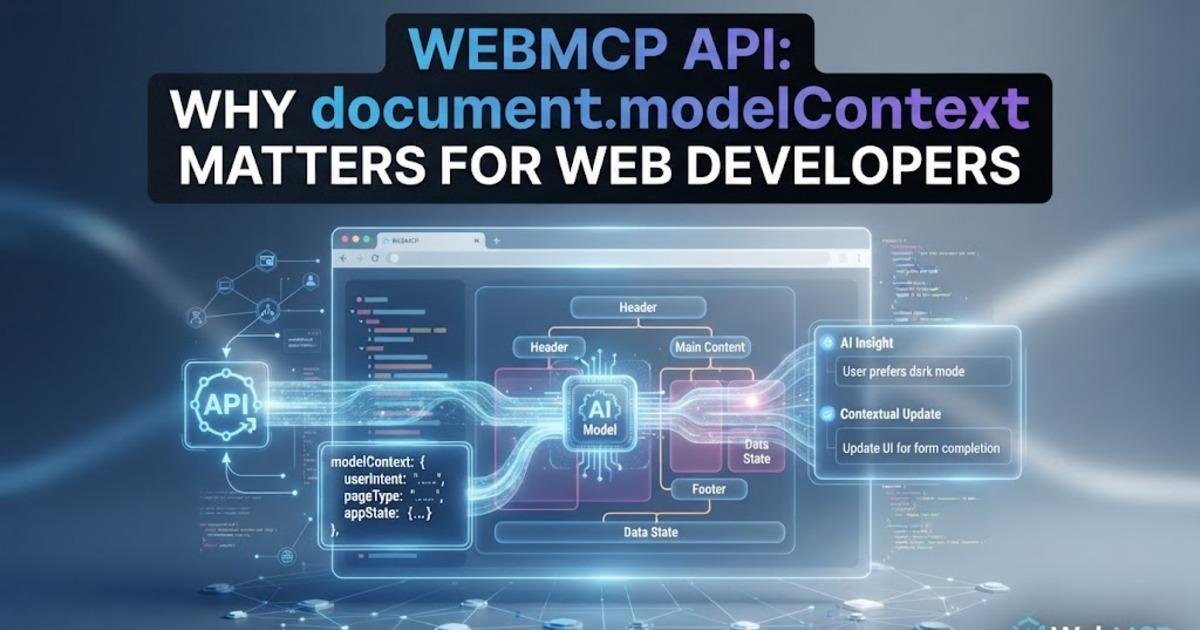
WebMCP API: Why document.modelContext Matters for Web Developers
WebMCP is evolving into a structured way for websites to expose actions to AI agents. Here is how document.modelContext, tool schemas, security, testing, and browser support affect web developers.
On this page
WebMCP is moving from an early browser experiment toward a more defined web platform interface, and the change that matters most to developers is easy to miss: the current specification uses document.modelContext as the entry point for exposing website functionality to artificial intelligence agents. The Web Machine Learning Community Group published a new draft on September 28, 2026, while Chrome's WebMCP documentation was updated on October 1. Together, those changes make this less about a browser demo and more about how developers can design websites that expose structured actions to agents without replacing their existing user interface.
WebMCP gives a web page tools instead of making an agent guess at buttons
The Web Model Context Protocol, abbreviated WebMCP, lets a web application expose functions as named tools that an agent can discover and invoke with structured inputs. The key difference from ordinary browser automation is that the agent does not have to infer that a particular button means “add this product” or that a form field expects a particular kind of value. The website can describe the action and its input schema directly, allowing the agent to call application logic rather than reconstructing a user's clicks from the rendered page. The current draft describes these tools as JavaScript-based functionality that can be invoked by agents, browser agents, and assistive technologies.
That does not mean WebMCP replaces HTML, JavaScript, or a normal website interface. A human can continue using the same page, while an agent gets an additional structured way to perform supported tasks. This is useful for applications such as shopping, booking, account management, diagnostics, and other workflows where an agent needs to perform several precise actions. The important architectural idea is that the web page becomes capable of explaining its available operations instead of leaving every agent to interpret the interface independently.
The API moved to document.modelContext
Developers following older WebMCP examples need to pay attention to the API's evolution. The current specification identifies document.modelContext as the interface through which web applications register and manage their tools, while older material may show navigator.modelContext. The specification repository's September 26 commit also shows that the API is still being actively refined, so copying an early example without checking the current documentation can leave a project using an outdated interface.
This is more than a naming detail because WebMCP is still a draft Community Group specification rather than a finished web standard. The September 28 draft is explicitly labeled a Draft Community Group Report, and browser implementation is still being developed alongside the specification. Developers should therefore treat current WebMCP code as an integration against an evolving API, not as a permanently fixed browser contract. That distinction becomes especially important for production sites where a browser capability cannot be treated like a mature HTML element with years of compatibility history.
WebMCP currently supports two ways to expose website actions
Chrome's documentation describes two approaches for creating WebMCP tools. The imperative API lets developers define tools with JavaScript, which is useful when an action is backed by existing application logic, state, or a more complicated workflow. The declarative API works with standard HTML forms, allowing familiar form-based interactions to be exposed as tools without rebuilding the entire operation around custom JavaScript. That gives developers a choice between describing an existing form and directly connecting an agent-facing tool to application code.
The distinction is useful when planning a real site. A simple search or data-entry operation may fit naturally into the declarative approach because the HTML already describes the fields and submission behavior. A multi-step operation such as checking inventory, selecting an item, calculating an option, and submitting a request may be better represented by a purpose-built JavaScript tool. Google recommends starting with a tool strategy rather than exposing every possible function, because a large collection of poorly defined tools can make agent behavior harder to control and test.
Tool descriptions become part of the web application's interface
A WebMCP tool is not simply a JavaScript function with a different name. It needs a description that tells an agent what the operation does and structured information describing its inputs. That makes naming and schema design part of the application's interface in a way many web developers have not previously had to consider. If a tool accepts a product identifier, quantity, or account setting, those inputs need clear definitions and validation rather than relying on an agent to infer what the developer intended.
This also changes how developers should think about semantic HTML. Google recommends clear language and semantic HTML as part of WebMCP best practices, because the information already present in a well-structured website can help define reliable interactions. The goal is not to create a second hidden website specifically for agents. It is to expose the meaningful operations that already exist while making their inputs and expected behavior explicit enough for both automated and human-assisted workflows.
Security becomes an application responsibility, not just a browser problem
Giving an agent a structured action is fundamentally different from letting it read information. A tool that searches products may be relatively low risk, while a tool that changes an account setting, submits an order, or performs another consequential action can have real side effects. Chrome's security guidance warns that agents can be affected by indirect prompt injection, where malicious instructions are introduced through content the model processes. A WebMCP implementation therefore needs to treat every exposed action as an application capability that requires appropriate validation and authorization.
The safest design is to keep existing server-side permission checks intact even when a browser agent is calling a tool. WebMCP should provide another route into application functionality, not create a privileged route around authentication, authorization, validation, or confirmation requirements. Developers should also be careful about exposing tools that combine reading and writing operations when the user has not clearly requested the side effect. The browser can help an agent discover a capability, but the application still has to decide whether the current user is allowed to perform it.
Testing WebMCP requires more than checking whether a tool appears
Agent-driven interactions are probabilistic, meaning an agent can interpret the same natural-language request differently across runs. Chrome's WebMCP testing guidance therefore recommends evaluations, commonly called evals, to verify whether an agent knows when to call a tool, how to provide its inputs, and what result should be considered acceptable. A tool that technically registers but is frequently misunderstood is not a successful integration. Developers need to test the complete interaction from the user's request through tool selection, input validation, execution, and returned result.
GoogleChromeLabs also maintains a collection of WebMCP developer utilities and demos that includes a tool inspector and an evaluation utility. The inspector is designed to help developers see whether tools are correctly exposed and inspect their input schemas, while the evaluation tooling focuses on testing agent tool-calling behavior. That is a useful distinction: one checks whether the web application is exposing the capability correctly, while the other checks whether an agent can use that capability correctly.
Browser support is still experimental
WebMCP is not yet a universally available browser API. Chrome has an origin trial, which is a time-limited program for testing a web platform feature with real sites, and local development can also use a dedicated Chrome testing flag. Microsoft's Edge has an origin trial as well, while the WebMCP implementation-status document lists Firefox and Safari separately rather than presenting them as shipping implementations. Developers should therefore build compatibility handling around the feature rather than assuming every visitor can invoke WebMCP tools.
The standards situation is just as important as browser support. The WebMCP specification is being developed in the Web Machine Learning Community Group, and the September 28 draft is still marked as a Community Group Report rather than a finalized web standard. Recent commits and open discussions show that tool execution, input validation, navigation behavior, and other details continue to evolve. A production team experimenting with WebMCP should therefore isolate the integration so that changes to the draft API do not force a rewrite of unrelated application code.
The useful WebMCP projects will expose real tasks, not every function
The strongest use of WebMCP is not turning every JavaScript function into an agent tool. A better approach is to start with tasks users already perform repeatedly and identify the smallest reliable operation that lets an agent complete each task. Chrome's guidance recommends defining a tool strategy first, then designing schemas, building reliable tools, and testing them before release. That approach also makes security review easier because developers can identify exactly which capabilities are being exposed rather than reviewing an enormous collection of internal functions.
For a commerce site, that might mean exposing product search, availability lookup, and cart operations while keeping payment authorization under the site's existing controls. For a customer portal, it could mean retrieving an invoice or checking an order rather than exposing a generic database operation. The difference is important because the agent should receive a meaningful business action with constrained inputs, not a low-level function that gives it unnecessary control. WebMCP works best when the tool boundary matches something a user would actually ask the website to do.
Web developers should treat WebMCP as an additional interface layer
The September 2026 specification and October documentation update point toward a web where pages can expose structured capabilities directly to agents, but they do not eliminate the need for conventional web engineering. HTML remains the human-facing structure, JavaScript remains the application behavior, server-side authorization remains essential, and normal accessibility requirements still matter. WebMCP adds a machine-readable action layer on top of those foundations so an agent can interact with application capabilities without reconstructing every click from the screen.
For developers experimenting now, the sensible next step is to choose one low-risk workflow, expose it as a narrowly defined tool, test its schema and permissions, and evaluate how agents actually use it. Keep the implementation isolated because the specification is still changing, and avoid assuming that an origin trial represents permanent browser support. The interesting part of WebMCP is no longer simply whether an agent can click a website; it is whether developers can give agents precise capabilities while keeping the same application logic, security boundaries, and human control underneath.
Share this post