GitHub GH013 Push Rejected Error: Fix Ruleset Violations on GHES 3.21
Getting GH013 when pushing to GitHub Enterprise Server 3.21? Learn how to identify ruleset violations, fix unsigned commits and invalid metadata, and resolve restricted push operations without disabling security policies.

On this page
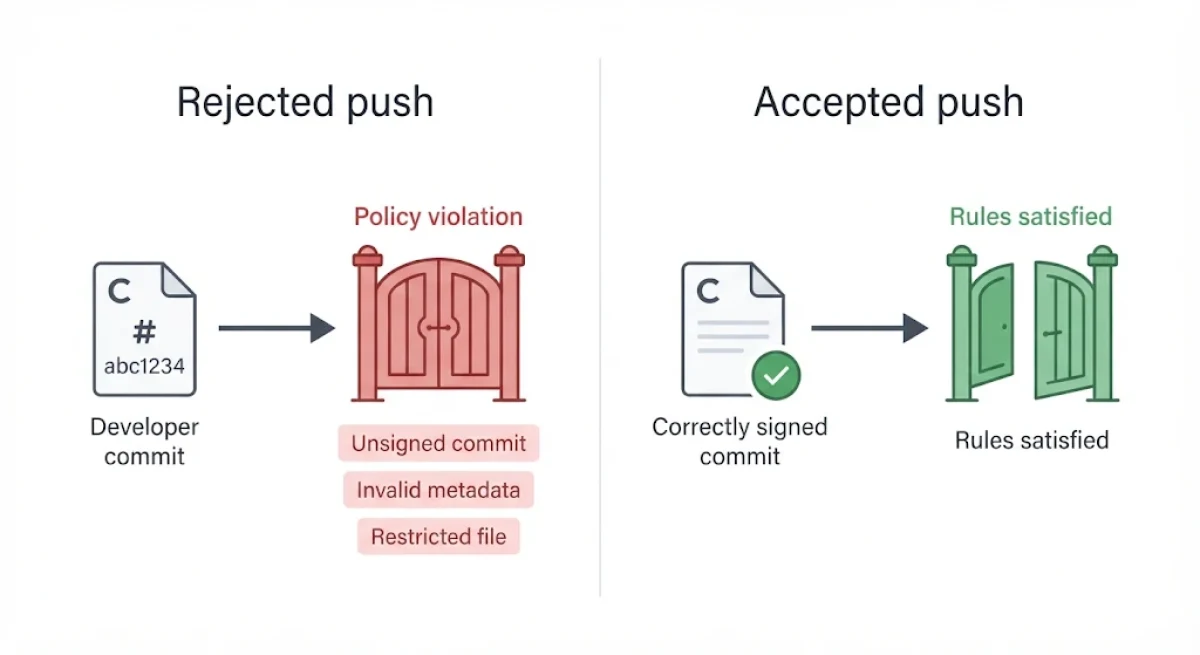
A Git push can upload its objects successfully and still fail when GitHub rejects the branch update with GH013: Repository rule violations found. The error means the destination repository has enforced a policy that one or more commits or the requested branch operation does not satisfy. This guide explains how to identify the exact rule, correct the underlying problem, and retry without weakening repository security.
This tutorial covers GitHub Enterprise Server (GHES) 3.21, released on June 11, 2026. Its documentation describes rulesets, commit-signature enforcement, metadata restrictions, and push-policy troubleshooting. The important distinction is that GH013 identifies a policy rejection, not one specific security vulnerability or a single universal configuration problem. GHES 3.21 release announcement.
What GH013 actually means when Git rejects a push
GitHub rulesets are collections of repository policies that control which changes contributors can push, create, or merge. Administrators can apply them to selected branches and tags at repository, organization, or enterprise level. When a push conflicts with an applicable rule, GitHub refuses the update rather than accepting a change that violates the configured policy.
A typical rejection identifies the affected branch and may include additional details explaining the violation. For example, the following is the documented form of the error:
remote: error: GH013: Repository rule violations found for refs/heads/main! [remote rejected] main -> main (push declined)
error: failed to push some refs to 'REPOSITORY_URL'
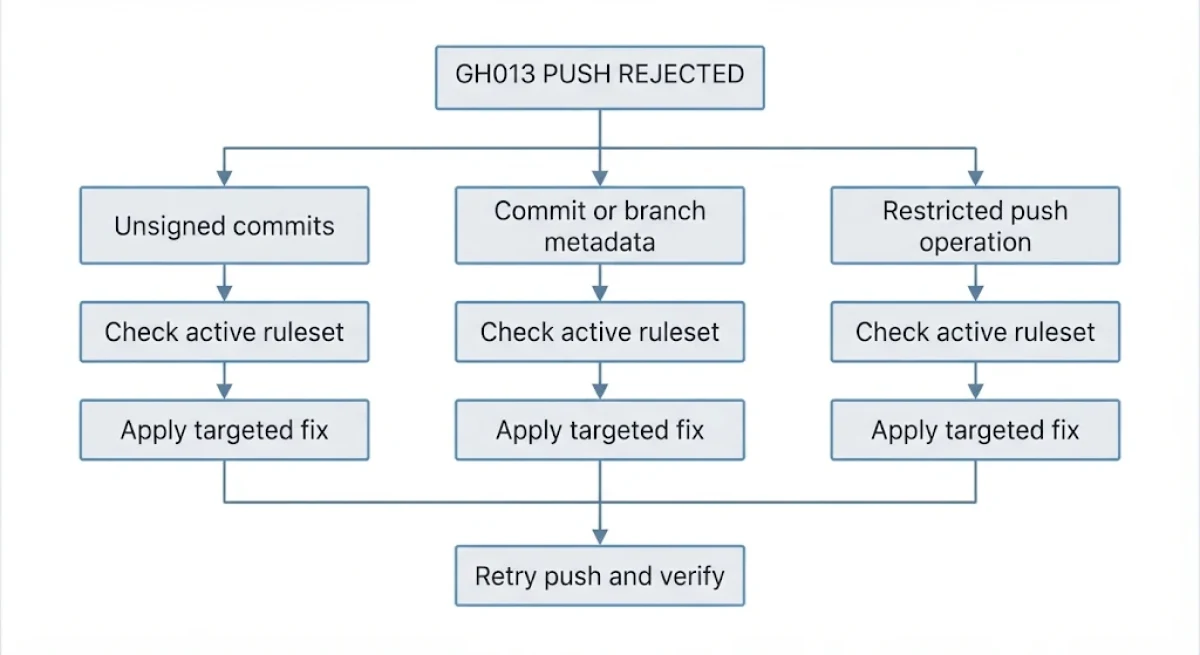
The branch name matters because rulesets can target particular branches or tags. However, GH013 alone does not tell you whether the problem is unsigned commits, an invalid commit message, a restricted file, or another policy. Look at the complete remote response before changing your Git configuration.
Start by identifying which rule rejected the push
First, inspect the complete output from the failed push. Record the affected branch, any rule identifier, and any additional explanation returned by GitHub. Then check your current branch and recent commit history so you know exactly which changes are being submitted.
git status
git branch --show-current
git log -5 --oneline
git remote -v
These commands provide local repository information without changing commits or remote configuration. Next, ask a repository administrator to inspect the active rulesets targeting the affected branch. GitHub's official ruleset troubleshooting documentation explains how contributors can investigate rejected operations and identify the applicable restrictions.
Cause one: Your commits are not signed or verified
One common reason for a ruleset rejection is a requirement for signed commits. A signed commit contains a cryptographic signature that GitHub can verify against the contributor's configured signing identity. If a branch requires verified signatures, unsigned commits or signatures that GitHub cannot verify will not satisfy that rule.
Check the latest commit with:
git log -1 --show-signatureIf the output does not show a valid signature, check whether commit signing is required by the active ruleset. A missing signature and an invalid signature are different problems: the first requires signing the commit, while the second requires investigating the signing key, identity, or verification configuration.
For Git users who need GPG signing, configure the appropriate key and enable signing for future commits:
git config --global user.signingkey YOUR_GPG_KEY_ID
git config --global commit.gpgsign true
Replace the placeholder with your actual signing-key identifier. If an existing local commit is unsigned, amend it after configuring signing:
git commit --amend -S --no-edit
git push
If several earlier commits are unsigned, they may also need to be rewritten and signed. Coordinate with collaborators before rewriting shared history. GitHub documents the distinction between signed commits and ruleset enforcement in its available ruleset rules.
Cause two: Your commit message or branch name violates a policy
Organizations can restrict commit metadata, including commit-message patterns and branch or tag naming conventions. For example, a repository may require an issue reference at the beginning of every commit message. A commit that does not follow that pattern can be rejected even when its source code is correct and its signature is valid.
Inspect the commit messages included in your push:
git log origin/main..HEAD --onelineReplace origin/main with the correct remote-tracking branch if you are pushing somewhere other than main. Compare the messages and branch name against the exact pattern supplied by the rejection or the repository administrator.
If the latest commit message needs correction, amend it:
git commit --amend -m "PROJ-123: Fix authentication validation"
git push
The example message is illustrative; use the actual issue identifier and format required by your repository. If earlier commits violate the policy, use an interactive rebase to edit the affected messages. Do not invent a naming convention or modify unrelated commits simply to make the push succeed.
Cause three: A push restriction blocks the operation or its files
Some rulesets restrict the operations contributors can perform, including force pushes and updates to protected branches. GitHub Enterprise Server also supports push rulesets that can restrict file paths and file sizes. A push can therefore fail even when every commit is signed and its metadata follows the required pattern.
Check whether the rejection concerns a restricted file, an oversized file, a prohibited branch operation, or a push that exceeds the permitted reference-update limit. GHES 3.21 documentation specifies a maximum of 1,000 reference updates per push when using push rulesets. This matters particularly for bulk operations that update many branches or tags together.
The appropriate fix depends on the restriction. Remove or relocate a prohibited file only after confirming the repository's approved storage policy, reduce an oversized file where appropriate, or split a large multi-reference push into smaller operations. If force pushes are blocked, use the normal pull-request workflow rather than attempting to bypass the restriction.
For a restriction that appears incorrect, ask the administrator to review the ruleset's target, conditions, and permitted exceptions. The official ruleset reference explains the available enforcement options.
How to verify the fix without weakening repository security
After correcting the identified violation, inspect your local changes and commit history again. Confirm that the affected commits have valid signatures if signing is required, that their metadata matches the repository policy, and that the proposed operation does not conflict with push restrictions. Then retry the push using the original destination branch.
git status
git log -5 --show-signature
git push origin main
Change main if your destination branch has another name. If the push succeeds, verify that the expected commits appear on the remote branch. If GH013 returns, do not assume the first problem was not fixed; another rule may be rejecting the same push.
Prevent the same rejection on future pushes
Establish the repository's commit-message format, branch naming rules, signing requirements, and file restrictions before starting a new contribution. Configure commit signing locally when required, and use pull requests for protected branches instead of relying on direct pushes. Teams should document their rulesets and communicate changes to contributors so developers can catch policy violations before submitting commits.
Administrators should also review ruleset exceptions carefully. A narrowly scoped bypass for an authorized workflow may be appropriate, but disabling an entire ruleset to resolve an individual contributor's error removes protections for other changes as well. GitHub's policy enforcement is intended to keep repository changes consistent, so correcting the offending commit or operation is generally safer than weakening the repository.
What GH013 does not tell you
GH013 is a general ruleset rejection indicator, not proof that your repository has been compromised or that GitHub has detected malware. It does not independently identify the exact offending commit or rule in every situation. Some restrictions require administrator access to inspect, and the correct fix depends on the active policy and the complete rejection message. If the rejection comes from a custom pre-receive hook rather than a ruleset, its administrator must investigate that separate enforcement mechanism.
Before your next push, obtain the exact rule responsible for the rejection and correct the specific violation. That gives you a repeatable fix while preserving the security controls protecting the repository.
Share this post

Written by